The short answer
Define the behavior that must stay the same, refactor one focused area, review the diff, and rerun the same checks afterward. Select any code and open Quick Edit from its shortcut or the script-editor context menu, or keep using the Refactor gutter icon for a whole function. Every entry point uses the same review flow before you apply a change.
Protect behavior before cleaning code
A refactor changes structure without intentionally changing observable behavior. First identify the inputs, outputs, signals, side effects, and edge cases that matter. Save the current work in version control and capture a quick baseline you can repeat after the edit.
- 1
Choose one responsibility
Start with one function or closely related block instead of rewriting an entire system.
- 2
Write down the contract
Record the expected return value, state changes, signals, and important edge cases.
- 3
Run a baseline
Exercise the affected scene before editing so you know what the current behavior looks like.
Review a GDSense refactor before applying it
Highlight any focused block you want to improve, then use the Quick Edit shortcut or choose Quick Edit from the script-editor context menu. For a complete function, the existing Refactor gutter icon remains available. Each path opens the same modal, mode picker, and reviewable diff.
- 1
Choose a focused selection
Highlight the exact lines you want to change, then use the Quick Edit shortcut or the script-editor context menu.
- 2
Keep the function-gutter flow when it fits
Click the Refactor gutter icon when the complete function is the right scope; it still opens the same workflow.
- 3
Describe the constraint
Say what should improve and what behavior, public method, or signal contract must remain unchanged.
- 4
Inspect the review window
Compare the original and proposed GDScript line by line before applying anything.
- 5
Apply or reject
Accept the proposal only when the diff matches your intent; otherwise revise the request or keep the original.
Reduce duplication in this damage calculation and make the intent clearer. Keep the same integer result for normal hits, critical hits, zero armor, and armor greater than damage. Do not change the function name or parameters.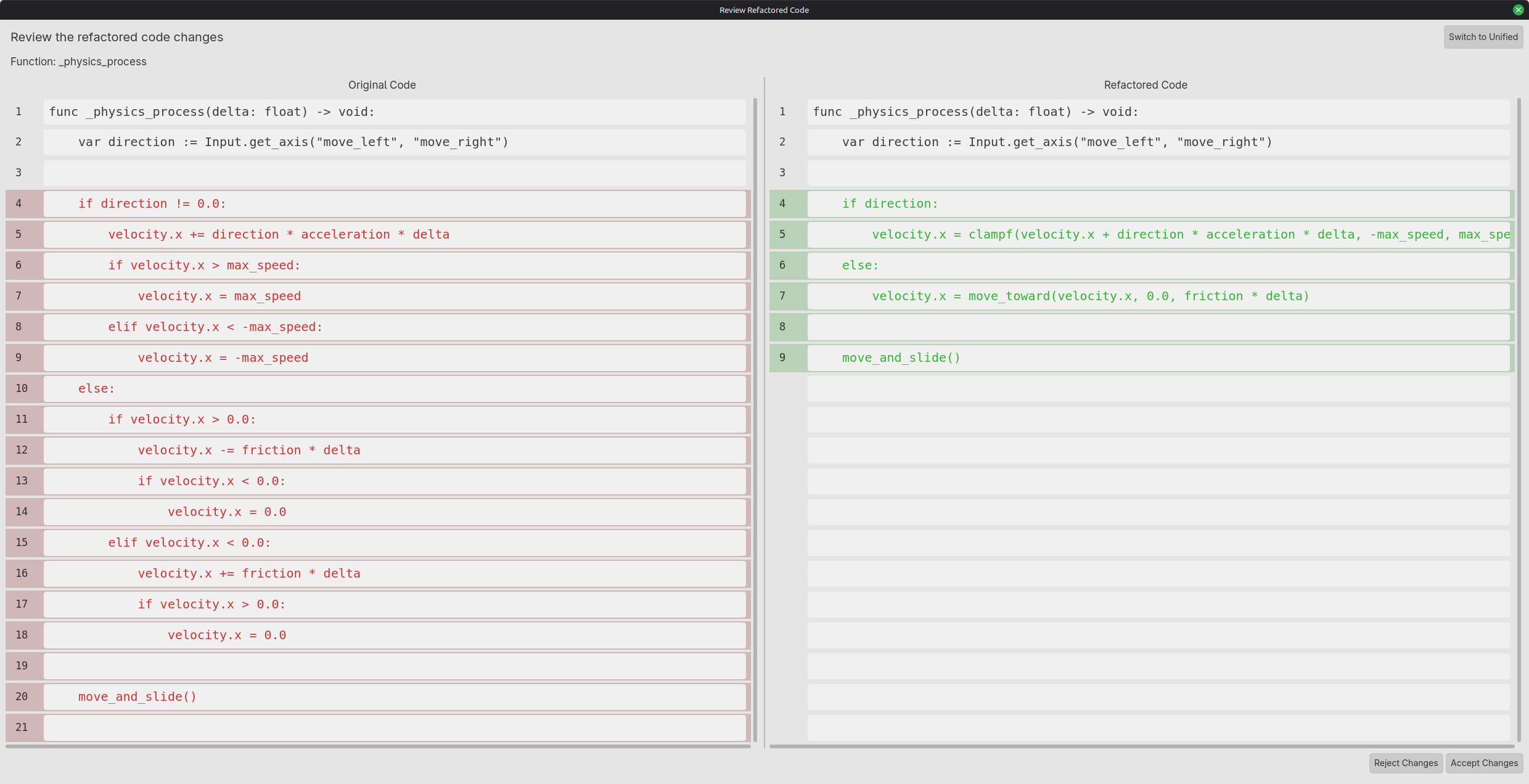
What does a behavior-preserving refactor look like?
Consider a damage function with duplicated armor handling. The contract is specific: critical hits double raw damage before armor, negative final damage clamps to zero, and inputs and output stay integers. Extract the duplicated operation only after writing down those rules.
func calculate_damage(raw_damage: int, armor: int, critical: bool) -> int:
    if critical:
        return maxi(raw_damage * 2 - armor, 0)
return maxi(raw_damage - armor, 0)func calculate_damage(raw_damage: int, armor: int, critical: bool) -> int:
var multiplier: int = 2 if critical else 1
return maxi(raw_damage * multiplier - armor, 0)func test_calculate_damage() -> void:
assert(calculate_damage(10, 3, false) == 7)
assert(calculate_damage(10, 3, true) == 17)
assert(calculate_damage(10, 0, false) == 10)
assert(calculate_damage(0, 3, true) == 0)
assert(calculate_damage(10, 30, true) == 0)
assert(calculate_damage(10, -2, false) == 12)Keep in mind: The last check preserves the existing treatment of negative armor. If your game should reject negative armor, make that a separate behavior change. Applying armor before the critical multiplier would also be a gameplay change, not this refactor. Assertions are development checks; do not use them as release-build input validation.
Which Godot details can a cleanup accidentally change?
GDScript structure is connected to scene resources, Inspector assignments, and engine callbacks. A function can look equivalent while a renamed export loses an assignment or a callback moves to a different update schedule. Review the scene and call sites alongside the selected code whenever those contracts are involved.
| Change | Potential behavior difference | Check before keeping it |
|---|---|---|
| Add static types | A formerly accepted value now fails validation or conversion | Test real inputs, null cases, and callers. |
| Cache a lookup with @onready | The node can be replaced after the reference was captured | Test scene reload, respawn, and dependency reassignment. |
| Replace a path with %UniqueName | Unique-name scope or editor marking may be missing | Mark the node unique and test every scene instance. |
| Move code between _process and _physics_process | Update timing and ordering change | Treat as a deliberate behavior/performance change, not cosmetic cleanup. |
| Rename an exported property or signal | Saved scene assignments or listeners may still use the old name | Inspect .tscn/.tres consumers and all connections. |
| Reverse a signal dependency | Initialization and callback order can change | Test first render, teardown, and repeated opening. |
How should I constrain an AI-assisted refactor?
Tell GDSense what may change and what must remain stable. Attach callers or the scene when they own the contract. A request to make code “cleaner” is underspecified if the assistant can rename signals, change serialized fields, or rewrite the input system.
@selection
Refactor only calculate_damage to remove duplication.
Preserve its name, typed parameters, integer result, and multiply-before-armor order.
Keep the existing negative-armor behavior. Do not edit call sites or scenes.
Explain the diff and check normal, critical, zero, over-armored, and negative-armor cases.
Keep in mind: If a proposed improvement needs a contract change, separate it into another request with its own acceptance checks. That makes regressions easier to locate and roll back.
Verify that behavior stayed the same
- Compare the complete diff, including changed types, signals, and node paths.
- Run the same scene and inputs captured before the refactor.
- Exercise boundary cases, not just the most common path.
- Use Godot warnings, tests, and version control to catch unintended changes.
Keep in mind: Cleaner code can still contain a regression. The review window helps you inspect the proposal, but the project must still be run and tested.